Every wordstillyours.
Perkins is a desktop studio for novelists, essayists, and screenwriters, with an AI editorial team that coaches like a great editor: principles, master examples, hard questions. It never writes your prose. That isn't a setting. It's the product.
Free 14-day trial · $89 once, yours forever · No subscriptions
Charles set the small parcel on the table between them and did not sit down. The gulls were loud over the hangar roof, and Eve found she was counting their cries rather than looking at the paper wrapping.
“He wanted you to have it,” Charles said. “At the end. It was nearly the only thing he said.”
The reader knows Charles was not at the airfield when Robert died. Eve doesn't. That gap is your engine. Hold it two more beats before she opens the parcel.
Principle, not rewriteNamed for Maxwell Perkins, the editor who made Hemingway better without writing a line of him.
No “apply rewrite.” Anywhere.
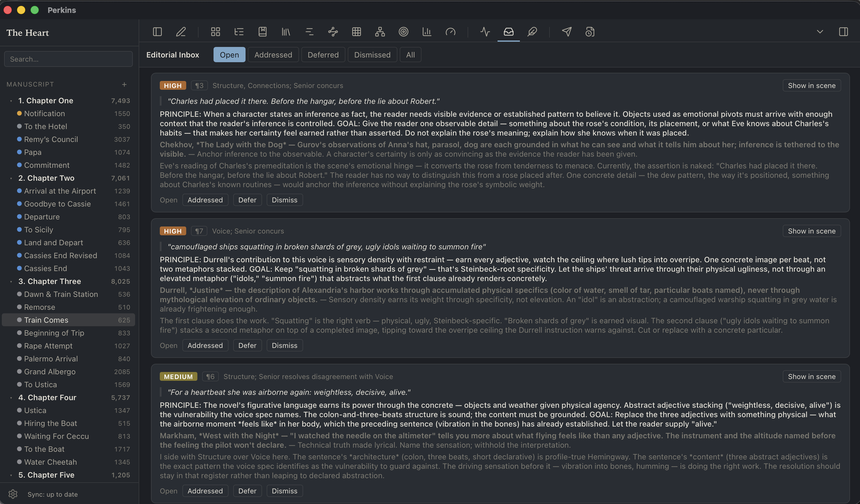
Editorial feedback arrives as a principle, a goal, and a master-author example. Never replacement sentences. There is no mechanism in Perkins that can move AI text into your manuscript. Not a toggle. Not a tier. Structural.
Your metadata, your yes.
The assistant can draft synopses, link your world bible, infer story dates, and map plot threads, as proposals you accept field by field. Cancel, and not one byte was written. And every project runs at the AI level you choose, with an exportable record of what happened.
A folder of Markdown you own.
Every scene, note, and codex entry is a plain text file on your machine. Open the folder in any editor, forever. Perkins organizes it; it never captures it.
Perkins keeps your prose 100% human-authored, so your copyright stays intact.
Copyright protects human authorship. Because the AI in Perkins never writes your expression, your words remain yours in the fullest sense.
One studio. Every shape a book takes.
Each format brings its own structure: a novel's chapters and scenes, an essay's sections, a screenplay's acts, with matching metadata, statuses, and compile rules. And if your form doesn't exist yet, define it. Upload a template and Perkins builds the studio around it.
Screenwriters get Fountain, the industry's plain-text screenplay standard: type INT. KITCHEN - NIGHT and Perkins knows it's a scene heading; character cues, dialogue, parentheticals, and transitions format themselves as you write, and compile to a properly measured Courier page. Your script stays a plain text file that any screenwriting tool can read. No lock-in, even here.
Five editors read your scene. None of them touch it.
The Reader
Experiences your scene as a first-time reader: what they know, suspect, feel, and carry forward. Deliberately isolated from your voice notes so the cold read stays honest.
The Structure Editor
Exact sentence rhythms, dialogue mechanics, period accuracy, continuity. Quantified diagnostics computed from your actual prose, not vibes.
The Voice Editor
Protects your voice profile and influence blend, watches prose musicality against your own rhythm system, and flags anything drifting toward the generic.
The Connections Editor
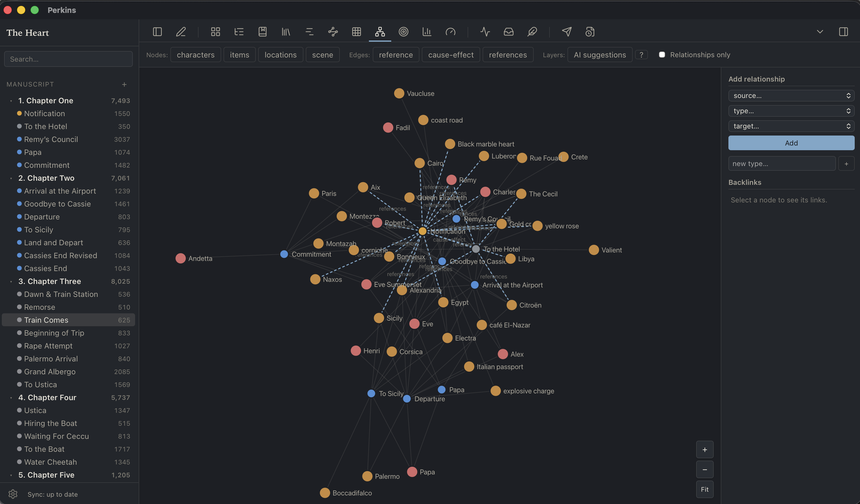
Finds the linkages you might miss: mirrored scenes, unpaid setups, orphaned payoffs, plot threads drifting apart. It suggests them in the relationship graph for your one-click confirm or dismiss.
The Senior Editor
Forms an independent view, then weighs every junior's findings into one prioritized editorial letter with a readiness score. The desk where it all comes together.
Every persona is editable. Add editors, remove them, route each to a different AI model: a frugal reader, a premium synthesizer. Your masthead, your rules.
All of them answer to one editorial constitution you can read and rewrite: don't embellish, be factual, be concise, never supply replacement prose. It sits above every editor, so no persona can talk its way out of it. Not even one you invent.
And then, the Fair Copy.
Writers have always finished this way. Austen, Dickens, every working novelist once wrote out a fair copy: the final version, fresh, in their own hand. Perkins brings the ritual back. When the editorial letters are read and the notes are addressed, study the scene, then rewrite it from memory beside a brief built from your own notes, with the editors' ideas distilled to bare principles and their words nowhere in the room. A verify stage measures the new draft beside the old, plainly, never as a grade. Then you choose. The coaching survives as craft. The last hand on the page is yours.
Write it by hand. Perkins will read it back to you.
Some writers draft on paper. Photograph the pages, bring the images to your desk, and Perkins transcribes them into the Desk Drawer, where arrivals wait until you decide where they belong. The photograph stays beside the text so you can check every word against your own handwriting. Words the machine could not read clearly are marked, not guessed.
Nothing reaches your manuscript until you have looked at the page and said yes, and when it does, the words are byte for byte the ones you approved.
The Desk Drawer takes typed notes too, with no machine involved at all: drop a text file in, or let one sync into the folder, and it is waiting when you sit down. Drop a bare text file anywhere in the project folder and Perkins will notice it and offer it to the Drawer; nothing is moved until you say so.
The machine reads. It never writes.
Art is human.
Perkins believes art is created by humans. We believe AI is a tool, and should always be human-first by design. We believe AI should never usurp the creative process or produce creative content.
Perkins does not strive to replace the editorial process. It exists to help a writer bring the strongest version of their art to the table, before a human editor ever enters the process.
Created by writers, for writers.
Draft, plan, and revise a whole book in one calm place.
Write
- A serif-first Markdown editor focus mode, typewriter scroll
- Flow view a chapter as one continuous page
- Snapshots & version history diff and revert any scene
- Split pane notes, codex, or an editor's letter beside your draft
- Read-aloud test the rhythm by ear
- Images & media on any page
- Desk Drawer half-formed things wait here until you decide where they belong
- Your style guide hand the desk a manual you own; editors cite it by rule
Plan
- Start from an outline import an OPML plan; every heading becomes a scene, ready to write
- Corkboard & Kanban cards by status, act, or POV
- Outliner every scene, every field, one grid
- Timeline reading order and story-world chronology
- Plotlines & plot grid threads as a subway map
- Codex & relationship graph your world, cross-referenced
- Setup/payoff tracker Chekhov's ledger, kept
- Historical record date a scene and see what your sources say about that day
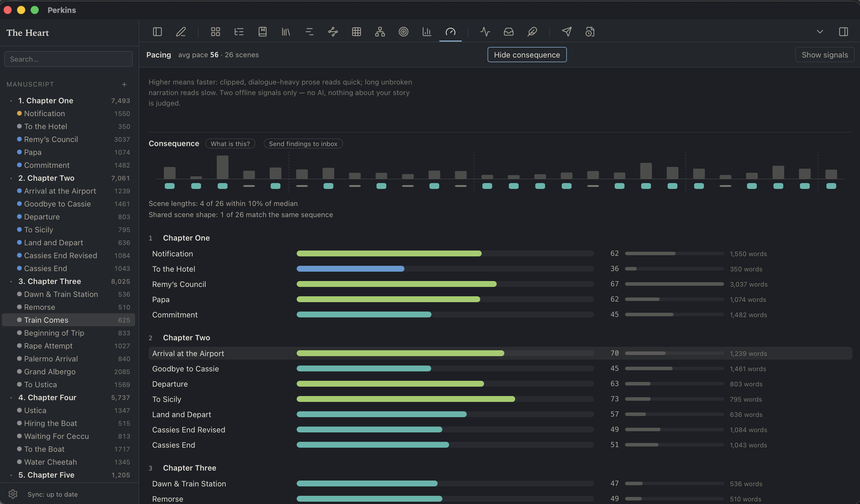
- Pacing map the measurable shape of the whole book
- Submissions tracker where it went, what came back
Coach
- Full editorial reviews five perspectives, one letter
- Editorial inbox every note tracked to your line
- Editorial memory decline a note once; they don't raise it twice
- Voice Health rhythm, vocabulary, AI-tell checks, offline & free
- Dialogue analysis does she sound like him? statistically, no
- Ask about your book “how often do Eve and Remy meet?”
- Assisted actions codex, dates, synopses, proposed for your yes
- Readiness scores watch a scene earn its “done”
- The Fair Copy pass rewrite from memory; end in your own hand
Nothing about your studio is fixed. Nothing about anyone else's is yours.
Your editors
Rewrite any editor's persona, clone one, add your own, or retire the whole desk. Route each editor to a different AI model: a frugal reader, a premium synthesizer.
Your voice
A voice profile built from passages of your own writing, with an influence blend you weight yourself. The editors protect it; they never average it away.
Your masters
The reference library maps craft problems to the authors you'd study for them. Curate it. Add the writers who taught you, remove the ones who didn't.
Your rhythm system
Name your prose registers and their rules, or turn the whole system off. The rhythm visualizer colors your sentences by your definitions, not ours.
Your workflow
Statuses, colors, tags, codex categories, review thresholds, banned vocabulary. Every vocabulary in the studio is editable, per writer and per project.
Your studios, plural
A spare thriller and a lyrical memoir shouldn't share an editor. Any project can override your voice, rhythm, and team, without touching your defaults.
Your manuscript never has an account.
Perkins runs on your machine and stores everything in a folder you choose. Version it with your own GitHub repository. Sync it through your own cloud folder. Or keep it on one laptop, off the grid entirely.
Choose how much AI. Then prove it.
Agents, publishers, and contests increasingly ask what part a machine played in your book. Perkins answers with a setting and a record, not a promise. Each project runs at the level you choose, and the level is enforced in the core of the app, not in a menu.
No AI
Zero model calls. Not a preference, a wall: the code that reaches a provider cannot even be called at this level. You still get the whole studio, because most of it was never AI. The organizer, the codex, the timelines, the pacing map, voice and dialogue statistics, deterministic connection reports, search across everything.
Organizational
The machine helps with the apparatus and nothing else: scene metadata, codex entries, story dates, chapter boundaries on an import. No editorial reading of your prose, no reviews, no coaching. For the many contracts that ask only about generated text, this is a clean answer.
Full studio
The editorial team reads and coaches. Everything on this page. And still, at this level as at every other, no AI text can enter your manuscript. That part is not a level. It is the architecture, and it does not have an off switch.
And beneath the levels, a second control: where your words may be sent at all. Set a project to local models only and nothing leaves your machine, a claim Perkins verifies against a live network monitor. Or restrict it to providers whose published terms exclude training on submitted content. The setting is enforced in the same gate as the levels, and the record carries it.
A record of how the book was built.
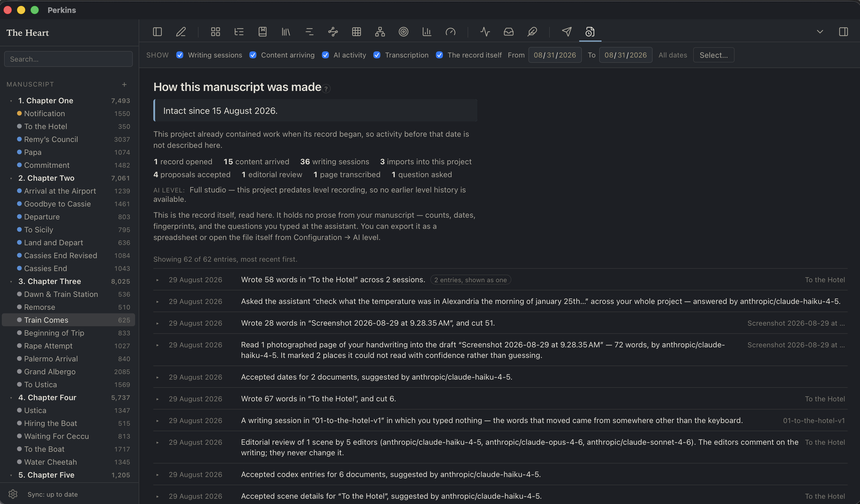
Perkins keeps a tamper-evident log of the things a publisher might reasonably ask about: every file you imported, every large paste that arrived from somewhere else, every metadata proposal you accepted, every editorial review you ran, and the writing sessions themselves, counted by where the words came from. Export it as a document: which level, since when, how many model calls, what came in from outside, how the manuscript accumulated over months of sessions.
The log holds no prose, only counts and fingerprints, so you can show the record without showing the book. And it states its own limits in plain language: it can tell you what happened inside Perkins, it cannot tell you who was at the keyboard. It is the difference between saying no AI wrote this and being able to show it.
You can read the whole record inside Perkins, in plain sentences rather than raw data: every import, every accepted proposal, every writing session, each saying what happened and whether a model was involved. Prefer a spreadsheet? Export the history as CSV, clearly marked as a copy, with the record of authority staying in your project. And the report names the reference material your desk could draw on, style guides and historical records alike, with when it was attached and what you approved.
A project that began as an import says so, in the record and the report: how many words arrived, from which file, on what date, with what came before honestly marked as beyond the record's sight. And wherever words arrived from outside, a paste, a file Perkins found in your folder, even a scene you edited in another app, you can say more. Pasted a paragraph back from a grammar checker? Add a note naming the source and the reason, on the spot or months later. Your note travels with the record, plainly marked as yours, and the report includes it only after you certify it is true. Perkins states what it saw; you state what you know; the reader can always tell which is which.
Five windows into the desk.
Real captures of the shipping app. Nothing mocked, nothing staged, nothing retouched.
Try it free. Then own it.
The complete studio, including the full editorial team. We count days you write, not days that pass, so write on weekends and the trial stretches for weeks.
- Every feature unlocked
- No credit card, no account
- Your files are yours from minute one
The editorial studio is what you're buying; the complete writing platform comes with it. Buy it once, use it forever. AI reviews run on your own API key or a free local model, and a built-in cost meter shows the price of every review, typically well under a dollar per scene.
- All current features, all future updates to this version
- Use on your own machines
- A lapsed or lost license can never lock your manuscript
- A second key to give away every purchase includes a 30-day full trial for a writer you know
No subscriptions. One-time purchase. Yours forever.
A one-time cohort
Founding Writers
We are giving free lifetime licenses to a small cohort of working writers. No obligations, no strings. Use Perkins on your real project and tell us where it fails you.
Apply to be a Founding WriterFair questions.
Will this make my book read like AI wrote it?
What about AI slop?
Can I make it follow my style guide?
Can it check my story against the historical record?
Can I edit my files outside Perkins?
Does this replace a human editor?
Which AI models does it use?
Can my words stay on my machine entirely?
My publisher asks about AI. What do I tell them?
Can I bring my book from another app?
What happens to my files if Perkins disappears?
Write the book. Keep every word.
Free 14-day trial, then $89 once. Yours forever. macOS, Windows, and Linux.